Continuous Integration
Fragalysis Stack development procedures for Kubernetes deployment and the role of GitHub Actions in the Fragalysis Stack CI process.
We rely on an external build process (GitHub Actions) to build, test and deploy the Fragalysis Stack container images.
GitHub Actions are a built-in feature of GitHub repositories.
We have added facilities to chain builds (for one GitHub repository to trigger another) using our custom trigger-ci-action GitHub Action. We deploy container images to the cluster using pre-configured AWX Job Templates using our custom trigger-awx-action GitHub Action.
Fragalysis Stack Repositories
There are four GitHub repositories involved in the build of the stack image:
fragalysis
fragalysis-backend
fragalysis-frontend
fragalysis-stack
The by-product of each repository is: -
- fragalysis
The output of the
fragalysisrepository is a small package of Python code, written to PyPI when the repository is tagged. The package is part of thefragalysis-backendimage’s Python requirements [1].- fragalysis-backend
The output of the
fragalysis-backendis a container image, written to Docker Hub. This image is used as aFROMimage in the Stack multi-stage build. The backend is based on a Python “slim-bullseye” image.- fragalysis-frontend
The output of the
fragalysis-frontendis a container image, written to Docker Hub. This image is used as aFROMimage in the Stack multi-stage build. The frontend is based on a Node “bullseye” image.- fragalysis-stack
The output of the
fragalysis-stackis a container image, written to Docker Hub, and is based on the content of both the frontend and backend images.
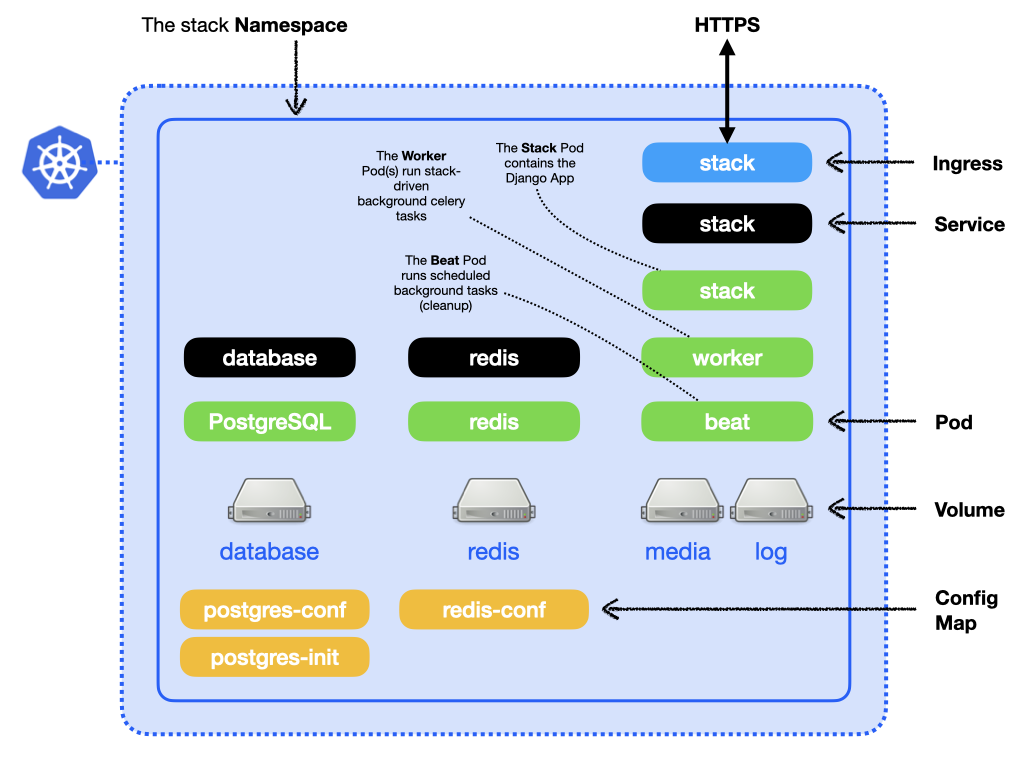
When deployed into a Kubernetes Namespace the the Fragalysis Stack manifests itself as a stack Pod (running the Django application) along with a database and a number of other objects, summarised in the following diagram: -
Build example (stack master)
Let’s see how GitHub Actions work for the Fragalysis Stack by exploring a simple example, where a user-change to a repository’s staging branch results in the stack being re-built, illustrated by the following diagram.
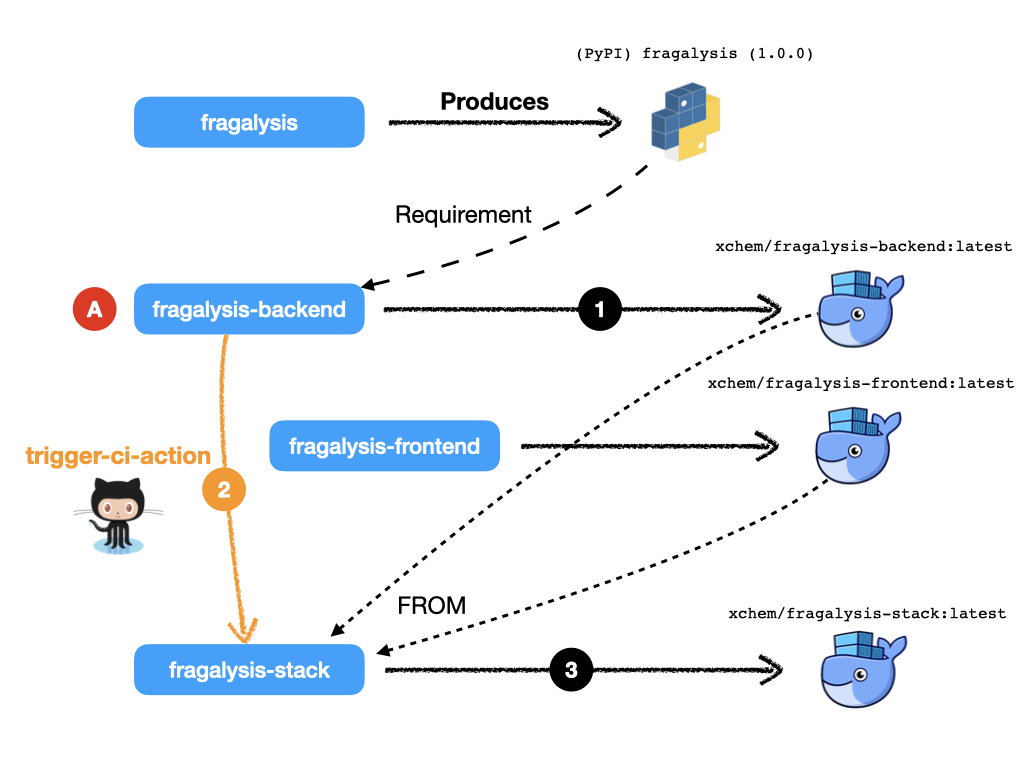
The diagram illustrates a user making a change (A) to the
staging branch of fragalysis-backend repository. The following steps
occur, in approximate order: -
GitHub Actions detect the change and a build takes place that results in a backend image build pushed to Docker Hub. The image pushed is
xchem/fragalysis-backend:latest.At the end of the backend build the Action triggers a build in the remote repository
fragalysis-stack. It uses our trigger-ci-action Action to do this.The
fragalysis-stackActions (triggered by the backend changes above) runs a build and its image is pushed to Docker Hub. The backend image is based on the contents of both the backend and frontend container images. The image pushed isxchem/fragalysis-stack:latest.
Importantly, there is only one branch in the stack repository, master.
More scenarios (here be Dragons)
That’s a simplistic illustration of a build chain from one staging
branch rippling through the dependent repositories.
But software development’s more complicated than just changes to the
staging branch and, in these cases, GitHub Actions will need some help.
How does the Action know which repos to trigger?
This is the responsibility of the repository owner. Our trigger-ci-action Action is used to simplify the calls the the GitHub API but the owner of each repository needs to know which repositories to trigger and simply uses the trigger-ci-action at a suitable point in their own workflow file.
The mechanism is essentially a push-driven trigger from upstream repository to downstream. A downstream repository cannot monitor upstream repositories, the author has to know which repositories depend on their code.
How does a repo know what container tag to use?
By convention, in a CI/CD sense, automated builds on staging produce
container images tagged latest. The Action build can be easily
configured to produce any tag but we tend to use latest or
the tag used when a repository Release or Tag is created.
How do I instruct the downstream to use my image?
In our example we’ve assumed the branch being manipulated is staging
and in this very simple workflow we want all the dependent staging
branches to build, resulting in their own latest images.
But what if you’re working on a defect on the backend, on a branch
called issue-1178.1? Do you want to trigger a rebuild of the Stack’s
latest image from fragalysis-backend:latest? No, you want the
stack to use fragalysis-backend:issue-1178.1 as its FROM.
So this is where the trigger-ci-action Acton, calling the GitHub REST API and your workflow file in both your upstream and downstream repositories become a little more complex…
The downstream (Stack) repository’s workflow file is configured to
expect a workflow_dispatch event, the variables of which are populated
pu the upstream Action’s use of its trigger-ci-action.
There are default values, namely: -
BE_NAMESPACEANDBE_IMAGE_TAG(defaulting toxchemandlatest)FE_NAMESPACEANDFE_IMAGE_TAG(defaulting toxchemandlatest)
All the upstream repository’s workflow file has to do is ensure that it injects appropriate values for these variables using the trigger-ci-action. For this example we’d set the variables:
with:
  ci-inputs: >-
    be_namespace=issue-1178.1
    be_image_tag=xchem
With this setup the triggered build will produce a Stack image based on our
issue-1178.1 backend image.
Brilliant!
But hold on - the stack will be based on issue-1178.1 while producing
its own latest image.
The stack’s downstream repository’s workflow_dispatch
handler also accommodates the variables stack_namespace and stack_version.
If you set these in your trigger action you can build a stack image
alanbchristie/fragalysis-stack:issue-1178.1 by setting the variables
stack_namespace and stack_version to alanbchristie and
issue-1178.1 respectively.
Simple … ish
- But what if you forget to set the variable?
After all, when you create your backend branch you need to adjust your own GitHub secrets to provide a value for the variable. If you forget (and you will) you’ll end up causing a new build of
latestin the downstream projects that contains your (probably untested) patch. Not what others might expect fromlatest.
What if I want to trigger a non-master downstream branch?
That’s a very good question.
If I have a issue-1178.1 branch in the upstream build and I want to trigger
the issue-1178.1 branch in the downstream project?
It’s solved by the trigger-ci-action Action, which allows you to pass in
a ci-ref definition so that GitHub builds the branch you name rather than
the default master.
Brilliant!
If you’re clever enough you could even pass this value on to downstreams of the downstream, but that doesn’t apply in our case and starts to get complex very quickly.
- But what if you forget to set the variable?
Mmmm … OK … I see a pattern emerging here.
Basically this is where it all gets rather messy, complex and complicated and unless you are very, very disciplined in your project organisation and development you should be treading extremely carefully.
I have a fork of the frontend, how do I…
Here we’d like changes in a branch of a fork of one repository to trigger the build of a branch in the fork of another repository…
STOP! It’s just getting mind-bendingly complex.
- Mmmmm
We’re starting to sink deeper into a very complicated world.
Development Recommendation
For the main production images for STAGING (latest) and PRODUCTION (tagged) we…
…utilise trigger-ci-action actions in the main
xchemrepositories. The build triggers are used exclusively for the automatic production oflatestimages on themasterbranch of the stack.Similarly, GitHub builds tagged images on the main
xchemrepositories based on the presence of a release (or tag) in the repository.fragalysis-backend:2023.11.1is automatically produced when the owner applies the tag2023.11.1to thefragalysis-backendrepository.
The main stack deployment is therefore automatic, continuous, fast but, above all, simple.
Individual developers…
…work on branches of the main repositories or (ideally) on branches of forks of the main repos.
No images are automatically produced from changes to branches or forks.
Developers are responsible for building their own container images and for pushing them to Docker Hub. Tina working on branch
issue-1178.1in a fork of thefragalysis-frontendrepository is responsible for producing the correspondingstackimage by (ideally) also forking and manipulating thefragalysis-stackrepository so that it clones her frontend code rather than the code fromxchem/fragalysis-frontend.In order to deploy their project to Kubernetes (the subject of another guide), users may push their container image to any Docker Hub namespace, project or tag. Tina can push her image as
xyz/stack-tina:issue-1178.1if she chooses. This works because she will have deployed her project to Kubernetes (now a developer responsibility) configured tso her cloud deployment’s stack should run using the imagexyz/stack-tina:issue-1178.1(rather than the defaultxchem/fragalysis-stack:latest). Tina can also select the version of the database she wants to use and the URL of the graph database. When she’s done she destroys the Kubernetes project.
The above places significant responsibility on the developer - they have to create the images, they have to push them, they have to create the Kubernetes deployments (subject of another guide) and they have to understand the build process.
But, this is a significantly simpler and a relatively pain-free route to supporting unlimited multi-developer deployments than could be achieved by any automatic system in the timescale available.
After all, if you’re expect to have 20 or 30 developers all on different forks and branches, all developing different aspects of the code, an automatic build system would be enormously complex, fragile and costly to maintain.
Development Examples
To further illustrate the knock-on effect of the above recommendation for individual developers, i.e. that developers are responsible for their own container images using repository forks and branches, a few examples follow.
The following relies on the use of standard Docker build arguments and the ability to use build-time args in the FROM statement, i.e. Docker v17.05 or later.
Developing Front-end (F/E) Code Example
Here you’re developing front-end code, relying on a published backend image and the existing stack implementation.
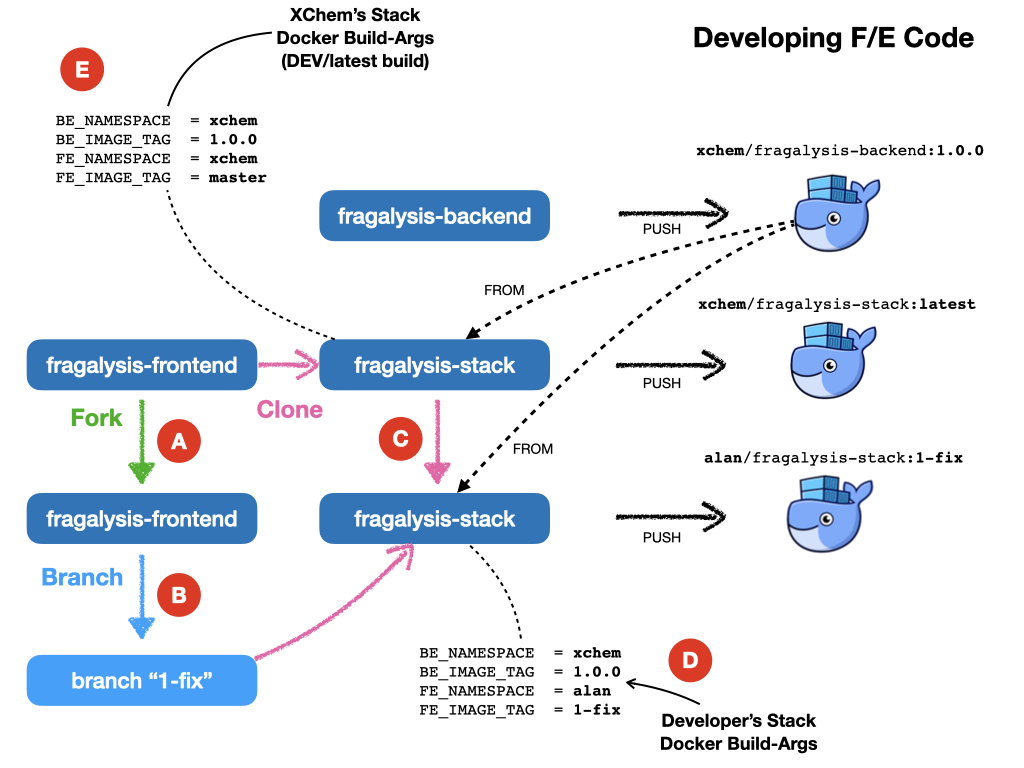
The developer forks
xchem/fragslysis-frontend, into, sayalan/fragslysis-frontend(A)The developer creates a branch and clones it, e.g.
1-fix, in order to make changes (B)The developer clones
xchem/fragslysis-stack(C)When a stack image is to be tested the developer builds the stack (locally) using Docker. This could be achieved through the use of a build script [2]) where the developer provides a suitable set of build-args, as shown (D).
Upon conclusion of development a pull-request on the frontend repository propagates the changes back to the XChem repo.
The produced stack, built from a tagged backend and the code in the developer’s 1-fix branch of their front-end repo fork, can then be pushed to Docker-hub and the Kubernetes cluster triggered to pull and run the updated code.
The diagram also illustrates how the XChem STAGING/latest Fragalysis Stack
is built and deployed (automatically using GitHub). This official stack uses
a tagged b/e image (the same version in this example) but its build args
(E) are such that is uses the master branch of the xchem project
as the source of the front-end code [3].
Developing Back-end (B/E) Code Example
Here you’re developing back-end code, relying on existing front-end and stack implementation.
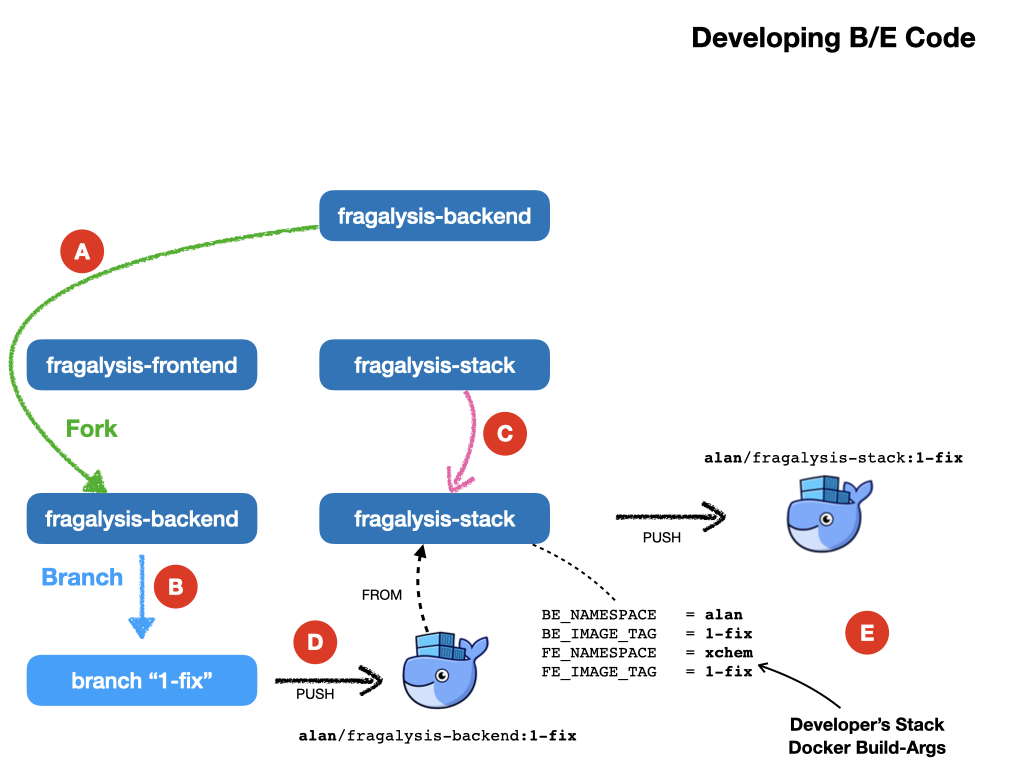
Here, in a less cluttered diagram: -
The developer forks
xchem/fragslysis-backend, into, sayalan/fragslysis-backend(A)The developer creates a branch and clones it, e.g.
1-fix, in order to make changes (B)The developer clones
xchem/fragslysis-stack(C)When a stack image is to be tested the developer needs to build their own b/e image (D) (which they can optionally push to Docker hub) and then build the stack (locally), providing suitable build-args, as shown (E).
Upon conclusion of development a pull-request on the b/e repository propagates the changes back to the XChem repo.
Developing Stack Code Example
Here you’re developing stack code, relying on a published back-end image and front-end implementation.
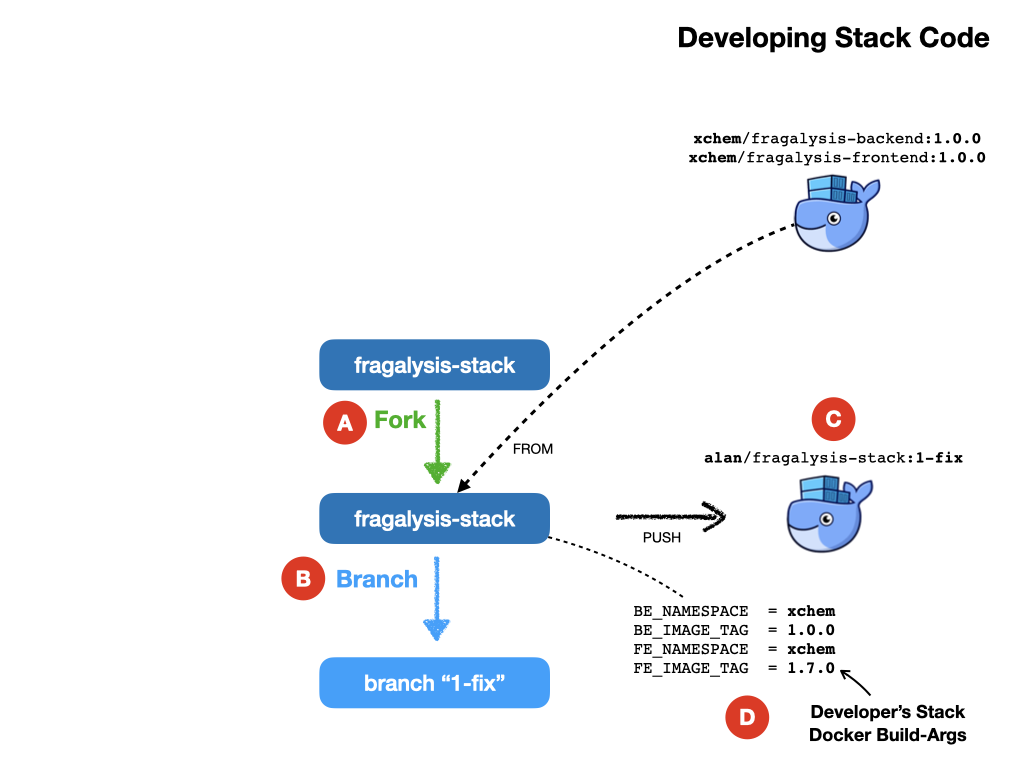
The developer forks the fragalysis stack repository (say to
alan) (A)The developer creates a branch and clones it, e.g.
1-fix, in order to make changes (B)When a stack image needs to be tested the developer needs to build their own stack image, which is pushed to Docker hub (C) providing suitable build-args, as shown (D).
Upon conclusion of development a pull-request on the stack repository propagates the changes back to the XChem repo.
Developing Everything Example
Here you’re developing front-end, back-end and stack code.
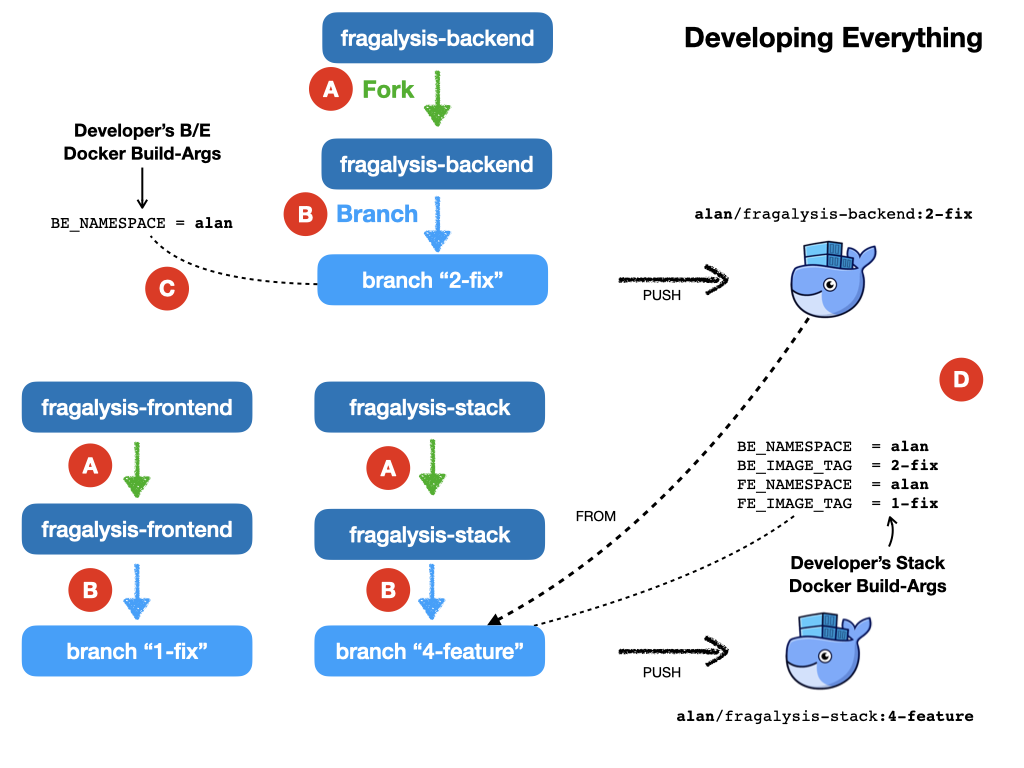
This is essentially a combination of the three prior scenarios.
The developer forks each repository (say to
alan) (A)The developer creates a feature branch in each fork and then clones that to make changes (B). In the diagram we have branches
1-fix,2-fixand4-featurefor the f/e, b/e and stack respectively.When a stack is to be tested the developer first builds their own b/e (C) using minimal build arguments [4]. The user then builds their own stack, from a clone of their code branch. Here you can see the stack is configured to use the
alan/fragalysis-backend:2-fiximage and a clone of the f/e1-fixbranch.The pushed stack can then be deployed to the Kubernetes cluster.
Upon conclusion of development pull-requests for b/e, f/e and stack repositories are made in order to propagate the changes back to the XChem repos.
Footnotes