Squonk Integration
The Data Manager is the core of Squonk2 products. It provides a managed environment for data and allows execution of applications and jobs that use that data to derive new data.
Fragalysis can utilise the Squonk2 Data Manager providing data to the platform against which select Jobs can be executed. The Data Manager is a Kubernetes-based service that provides authenticated access to Data, Jobs and an Accounting Server to track Job execution and file-storage usage.
Configuration
Configuring Fragalysis to interact with Squonk requires the satifaction of a number of prerequisites: -
A dedicated Organisation and Organisation User need to be created in Squonk (this is not covered in these notes)
Users needing to run Jobs will need the
squonk-userRole in Keycloak (this is not covered in these notes)A number of Fragalysis container Environment variables need to be set
Someone will need to select the Jobs that are to be offered and then create and load a Job Override definition
Environment Variables
To connect to a suitably configured Squonk service (see items 1 and 2) the following environment variables need to be provided in the Fragalysis container: -
Variable |
Description |
|---|---|
OIDC_AS_CLIENT_ID |
The client ID of the Squonk Account Server, as known to Keycloak |
OIDC_DM_CLIENT_ID |
The client ID of the Squonk Data Manager, as known to Keycloak |
SQUONK2_DMAPI_URL |
The URL of the Squonk Data Manager REST API, e.g.
|
SQUONK2_ASAPI_URL |
The URL of the Squonk Account Server REST API, e.g.
|
SQUONK2_UI_URL |
The URL of the Squonk UI, e.g. |
SQUONK2_ORG_OWNER |
The owner (User) of the Squonk Organisation created for
this Fragalysis Stack. Typically |
SQUONK2_ORG_OWNER_PASSWORD |
The password for the Squonk Organisation User |
SQUONK2_ORG_UUID |
The Squonk UUID of the Organisation assigned to this
Fragalysis Stack, e.g. |
SQUONK2_PRODUCT_FLAVOUR |
The flavour of the Squonk product to use. One of
|
SQUONK2_SLUG |
A short string used to correlate objects created in Squonk
with this Fragalysis Stack. The string is truncated to 10
characters. You might wish to distinguish the stack from others
with slugs like |
SQUONK2_UNIT_BILLING_DAY |
The day of the month on which the Squonk billing cycle starts.
A number with the value |
The Job Override
The Job Override is a JSON document that defines the Jobs that are to be offered by
the Fragalysis Stack from the /api/job_override endpoint.
By default a stack has no over-rides installed and the initial response will present the user with an empty list.
New over-rides are loaded into Fragalysis by the django admin user.
This user must login using the standard django admin page at /admin using the
username admin and the password exposed to the stack Pod in the environment
variable WEB_DJANGO_SUPERUSER_PASSWORD. The origin of the password is the django
Secret deployed in the stack’s Namespace.
- > Changing the value of the environment variable has no effect once the database
has been created. The admin user is only created once, so changing the password without resetting the django database will have no effect.
When logged-in the admin user can visit the api/job_override endpoint in a web browser.
The user will be presented with the list of over-rides (which may be empty) and can
paste the content of new one in the Override field of the POST dialogue
at the bottom of the page (you mau need to scroll down to see it): -
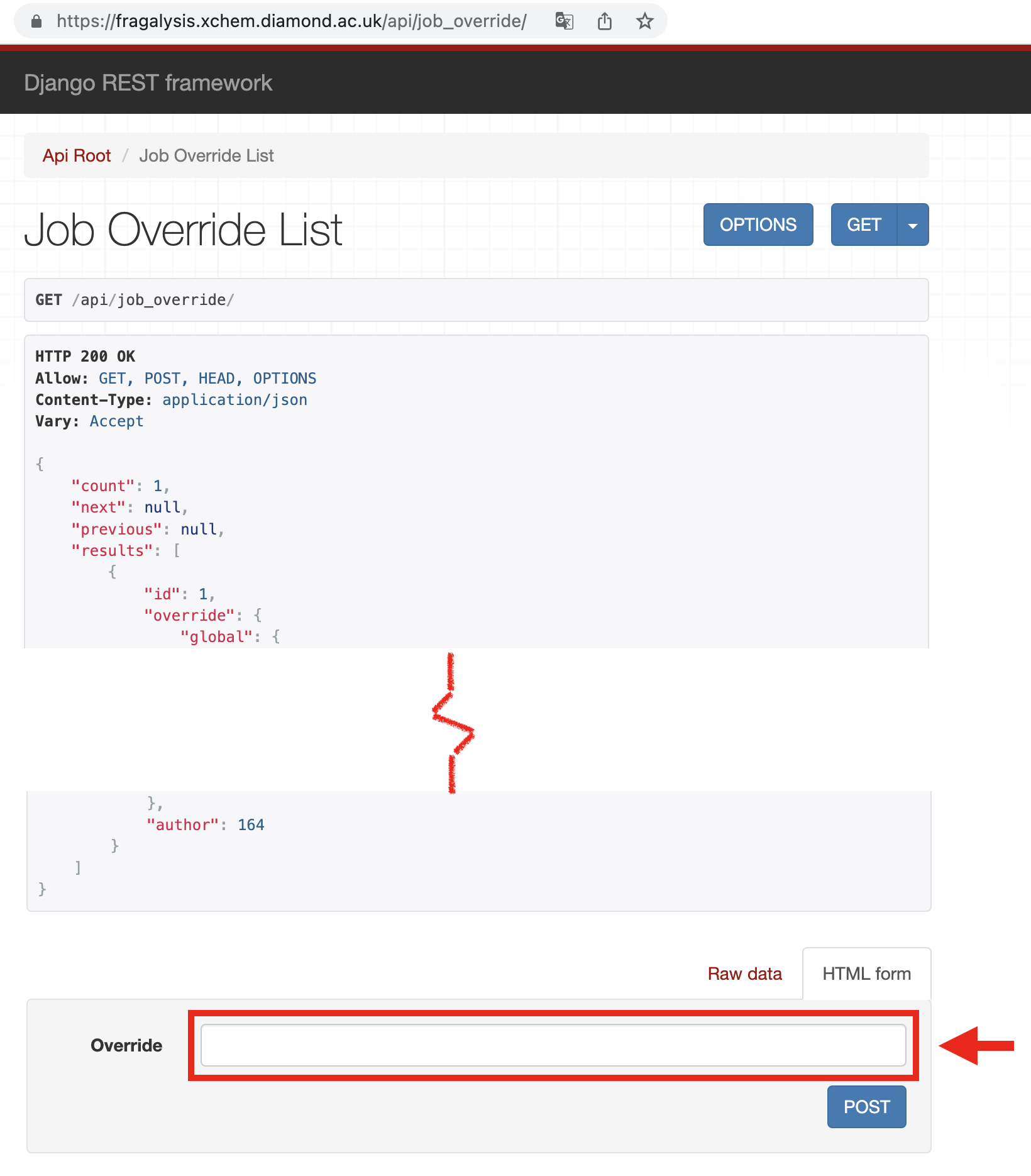
Clients, especially the Fragalysis Stack front-end, will use the /api/job_override
endpoint to retrieve the “current” (latest) over-ride and present the Jobs it refers to
to the user for selection and execution.
/api/job_overridereturns a list of overrides, with the first entry in the list representing the most recent override that has been loaded.
The latest official (complete) job override is maintained in the backend repository
in the directory viewer/squonk/. Select one of these files to load into
each new installation.
Getting Job Definitions
Once the above pre-requisites are satisfied a client (like the Fragalysis Stack Front End)
would issue a GET to /api/job_override. This will provide the client with
the list of jobs and details of how to map Fragalysis variables to each job variable.
Job’s are identified in the override fragalysis-jobs list with the properties
job_collection, job_name and job_version.
The client can obtain the Squonk job definitions for a given job by issuing
a GET to /api/job_config, and provide the collection, name and version of the job
to extract. For example, the fragmenstein-combine job can be obtained from Fragalysis
with a GET at /api/job_config?job_collection=fragmenstein&job_name=combine&job_version=1.0.0.
Executing a Job
Once the job variables have been set the client can execute the job by issuing a POST
to /api/job_request, after first calling /api/job_file_transfer so that
files referred to by the Job can be pre-loaded into Squonk. A GET from the
same endpoint will return the state of the running Job.