Relocation to EKS (basic)
These instructions cover the process of relocating a basic copy of the production fragalysis stack to an AWS EKS Kubernetes 1.23 cluster.
By relocation we mean moving the stack from A source cluster to a separate destination cluster.
Basic is meant to imply that the stack is not using any of the optional applications like an AWX ansible playbook server, Squonk, Discourse or a Graph Database.
The relocation uses playbooks already employed by the original AWX server but also requires some manual effort.
Note
These instructions, valid at the time they were written, do refer to components whose versions may no longer be appropriate. For example we refer to Kubernetes 1.23 which today (September 2025) is no longer supported. The instructions themselves (the process, the actions) are still relevant but if you attempt to repeat These instructions you must check the prevailing software versions. For example, today we use Kubernetes 1.31, and a custom xchem Keycloak (26.0.5).
Before you begin you will need: -
A compatible AWS EKS kubernetes cluster (i.e. Kubernetes 1.23)
Worker nodes, with each that providing at least 18Gi RAM and 8 cores with a combined total of at least 25Gi RAM cores and 12 cores.
Kubernetes config files for the source and destination clusters
Access to the production AWX server
An AWS S3 bucket
The Ansible Vault secret for the
roles/fragalysis-stack/vars/sensitive.vaultfile that is encrypted in the dls-fragalysis-stack-kubernetes repository
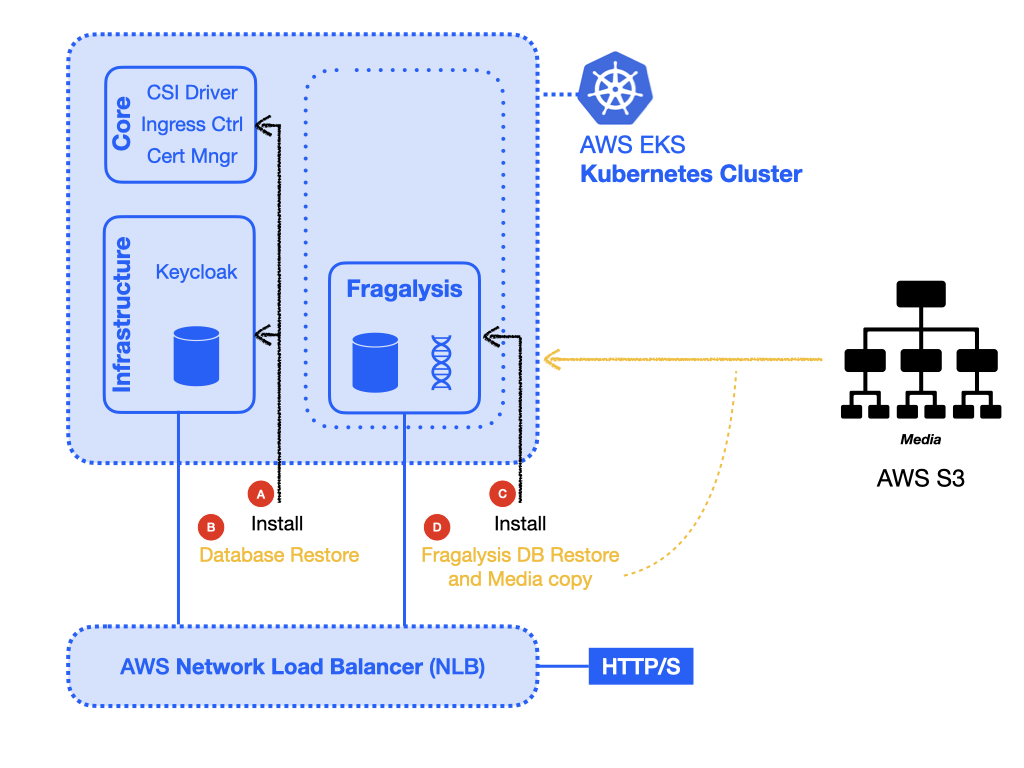
In order for the stack to operate it will need the following essential core and infrastructure components in the destination cluster: -
At least one Persistent volume StorageClass (core)
An nginx ingress controller (core)
The kubernetes certificate manager to manager SSL certificates (core)
A keycloak server (infrastructure) [1]
A PostgreSQL database for keycloak (infrastructure) [2]
There are four basic steps to the relocation: -
Preparation * Collect backups of data and media
Installation and recovery, which consisting of: - * core components in the destination cluster * Install and recover the infrastructure database * Install and recover the stack
What follows is a simplified guide to relocating the production stack to an AWS EKS cluster.
Warning
You should reserve at least 4 hours to complete the migration, which includes time to collect the data and media backups. The original stack will be at risk during this process and should not be used. You also need to consider the the time it takes to switch the required domains, which might have a long TTL (like 8 hours).
Preparation
Prior to relocating the production stack a we need to collect back-ups of the various databases and the fragalysis stack media directory. Basically all the data that is too complex to reproduce.
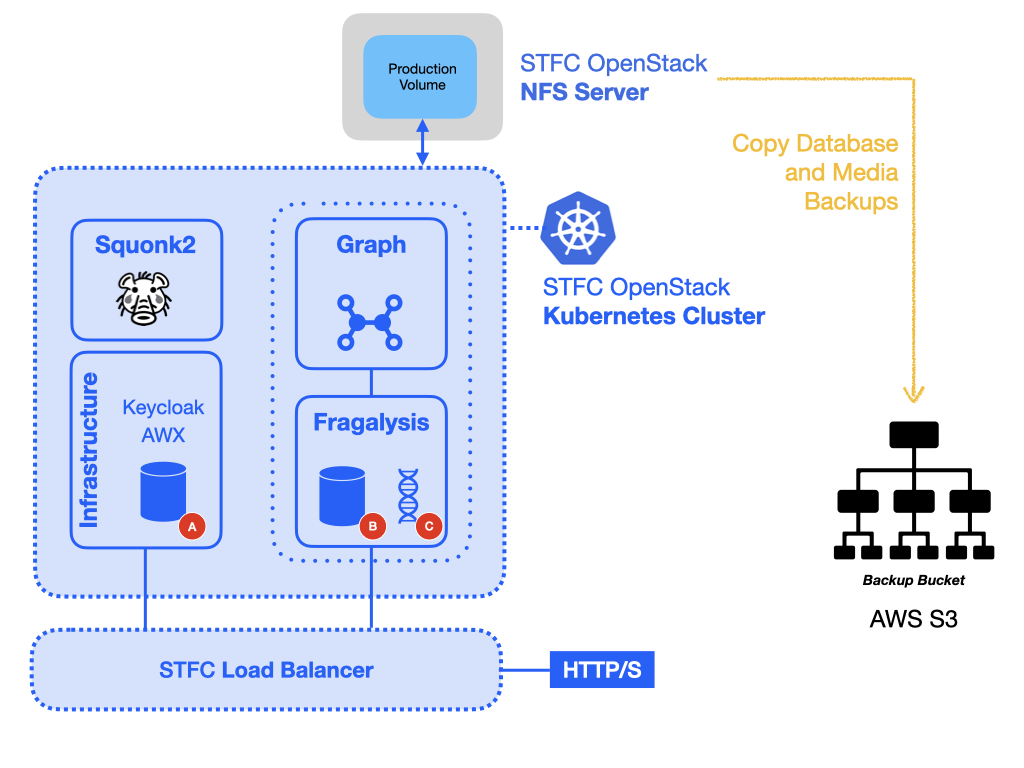
The data includes: -
The Keycloak infrastructure database (A)
The fragalysis stack django database (B)
The fragalysis stack media directory (C)
Installation and recovery
With preparation done up we can now install the infrastructure and then the stack on the new cluster whilst also restoring the data.
Deploying new stack versions
With a stack running you might want to deploy a new stack version. The following instructions cover the process of deploying a new version of the stack.
Moving back
When we’re finished with the destination cluster and you need to move the data back to the original cluster you’ll need to get new backups and move them back to the original stack.
Removal
When we’re finished with the destination cluster we can delete it.
Footnotes