The Rancher Server
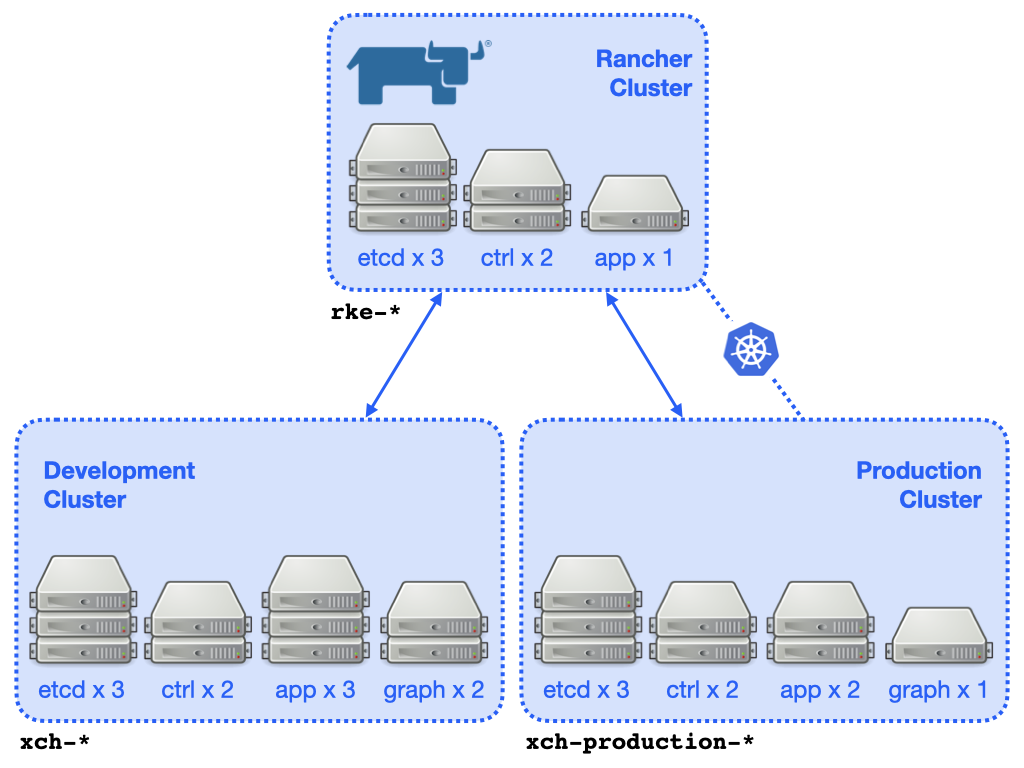
The DEVELOPMENT and PRODUCTION clusters have been created with, and are managed by Rancher, deployed to the STFC/OpenStack cluster on a dedicated kubernetes cluster configured using RKE: -
https://rancher-xchem.informaticsmatters.org
…where you will need suitable credentials in order to log-in.
A simplified depiction of the clusters can be seen in this diagram.
Each cluster consists of key etcd and control plane nodes
and various worker (app and graph) nodes. The instances are created
and managed by the Rancher server.
A full description of the Rancher installation and its configuration can be found in the following external (GoogleDoc) document: -
Warning
The cluster instances are created automatically by the Rancher server.
DO NOT edit or delete any compute instance that may be a Rancher-managed
Kubernetes instance via the STFC/OpenStack console. To help you identify
them the instances use a naming convention. In our case instance names
that belong the the cluster hosting Rancher begin rke-. Instance names
that belong to the DEVELOPMENT or PRODUCTION cluster begin xch-.
Cluster etcd backups
All Kubernetes objects are stored on etcd. Periodically backing up the etcd cluster data is important to recover Kubernetes clusters under disaster scenarios, such as losing all master nodes. The snapshot file contains all the Kubernetes states and critical information.
The backup of etcd for the RKE and Application clusters is automated using features built-in to RKE and Rancher, with snapshots written to an Informatics Matters AWS S3 bucket (detailed in the following sections).
The credentials used to create AWS S3 backups are those of the user
fragalysis-loaderon the Informatics Matters AWS account. The secret access key is stored in the Informatics Matters KeePassXC application (underAWS -> AWS S3 (Fragalysis) User).
Application clusters
A snapshot of each cluster’s etcd content is configured to occur regularly
with the local copy also copied to an Informatics Matters AWS S3 target
in the eu-central-1 region.
Backups of the application clusters is performed by Rancher.
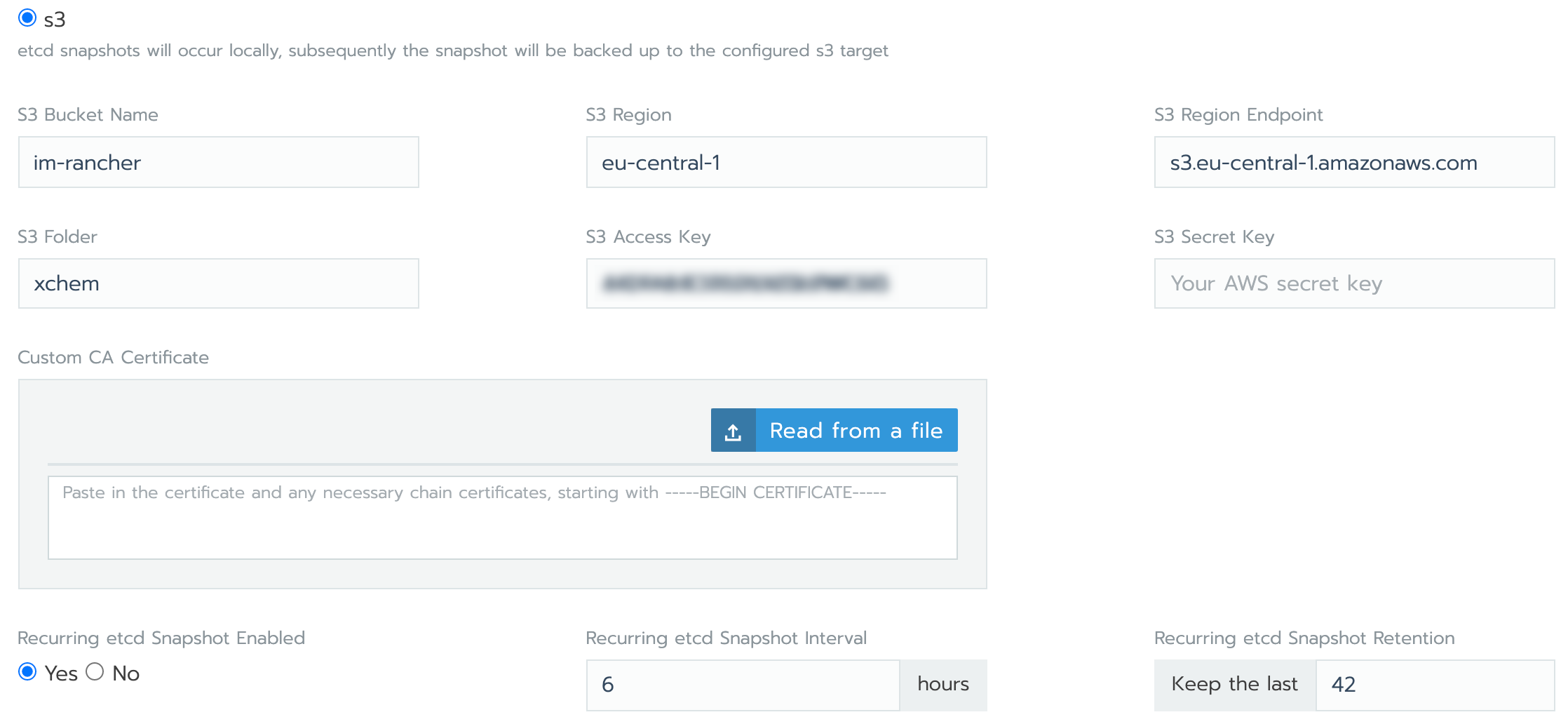
Typical automated AWS S3 backup settings are illustrated in the following Rancher cluster configuration screenshot: -
Cluster bucket and path details are as follows: -
The PRODUCTION cluster’s etcd is backed up to
im-rancher/xchem-production. This occurs every 6 hours and 28 copies are kept (a 7-day approximate history)The DEVELOPMENT cluster’s etcd is backed up to
im-rancher/xchem. This occurs every 6 hours and 42 copies are kept (a 10-day approximate history)
Individual backup file size [1] is approximately 7MB for DEVELOPMENT and 21MB for PRODUCTION.
Rancher (RKE) cluster
The etcd material for the RKE-formed Kubernetes cluster that hosts the Rancher
server is also backed up. This backup is performed by RKE and configured using
the RKE cluster.yml, which can be found in the rancher directory of the
Fragalysis deployment repository.
Cluster bucket and path details are as follows: -
The RKE cluster’s etcd is backed up to
im-rancher/rancher-xchem. This occurs every 6 hours and 21 copies are kept (a 5-day approximate history)
Individual backup file size [1] is approximately 8MB, with 3 files created per backup.
For details of backup configuration refer to the Rancher RKE backup documentation.
Cluster etcd recovery
Application clusters
Restoring an application cluster (PRODUCTION or DEVELOPMENT) from a backup is relatively straightforward. It can be done from within the Rancher console for the chosen cluster.
Follow the Rancher Restoring a Cluster from Backup documentation, remembering that we’re using a post v2.4.0 Rancher installation.
Rancher (RKE) cluster
Restoring the RKE-based cluster is a little more complicated, compared to restoring an application cluster, and you should follow the Rancher Restoring Backups—Kubernetes installs documentation, following the appropriate S3-based instructions.
Some example RKE scenarios are illustrated [2].
Footnotes